How to calculate your GPA from Schoology
Gradebook is a free high school GPA calculator. Copy your course names and grades from Schoology, or enter them by hand. Gradebook shows weighted GPA, unweighted GPA, and average grade. Your grades stay in your browser.
Open the GPA calculatorCopy and paste your grades
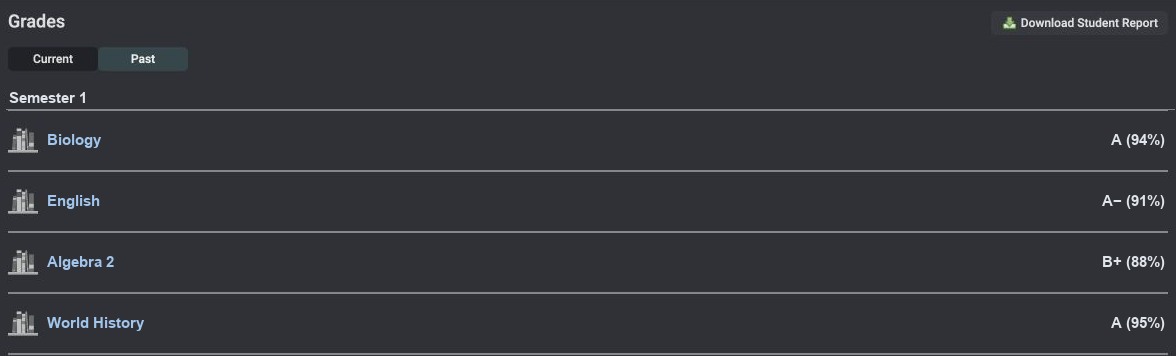
- Open your Grade Report in Schoology. Leave the classes closed and select the class names and grades for one semester.
- Copy the text and paste it into Import grades in Gradebook.
- Click Calculate my GPA. Check the semester and credits, then select Confirm & calculate.
Enter grades by hand
Open Your courses in Gradebook and fill in the blank row. Enter the class name, level, credits, and a letter grade or percentage. Use + Add course for each additional class. Your GPA updates as you edit.
How credits and course levels affect GPA
GPA is total grade points times credits for each class, divided by total credits. Weighted GPA can add points for Honors and AP classes. Unweighted GPA uses the base grade points.
For example, a 1-credit regular class with an A contributes 4.0 points. A 1-credit AP class with a B+ contributes 4.3 points with Gradebook’s default AP bonus. Together they give a 4.15 weighted GPA and a 3.65 unweighted GPA.
Gradebook suggests credits for recognized courses from La Salle College High School’s Program of Studies. Check how many credits apply to the semester you’re entering. Other schools may use different scales or credits. Use your transcript for your official GPA.
Calculate your GPA